A flexible alternative to rigid databases: meet Tana’s new view toolbar

Why we built a view toolbar
Tana’s power comes from the way it combines structured notes, tasks and connected knowledge into one system. Searches update live as your workspace changes, surfacing the information you need in real time. Views then let you choose how to look at that information: lists, tables, boards, calendars or plain outline.
Until now, switching between these options required opening the node options menu each time. For users managing complex projects, tracking many tasks, or exploring search results, this created unnecessary friction.
The new view toolbar makes these controls available exactly where you work, so you can move between different lenses without breaking focus.
A horizontal toolbar that adapts to your context
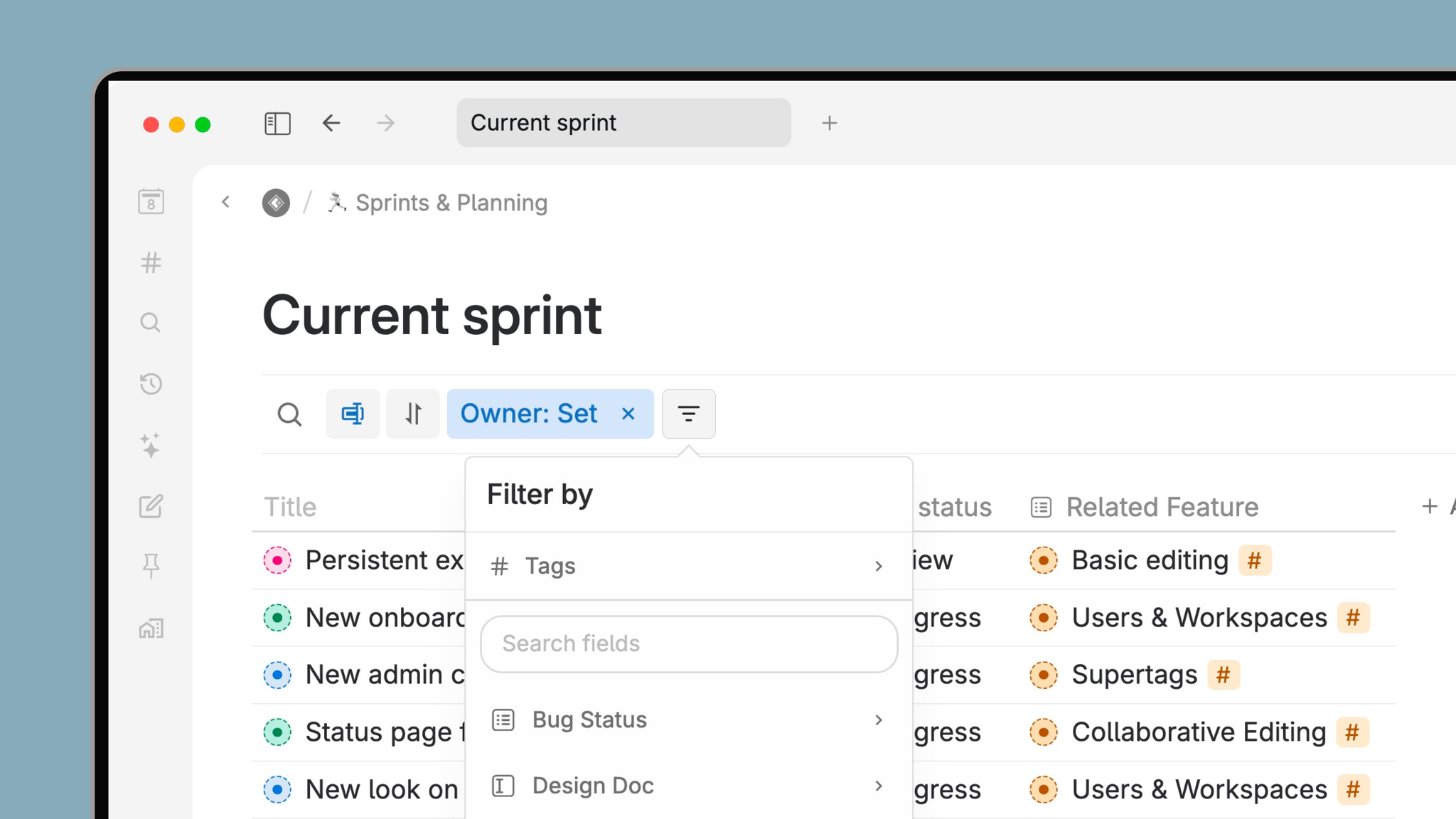
When you open a node, expand it inline, or view related content, the view toolbar appears right beneath it. It adapts to the space available, keeping controls within reach without taking over your screen.
The toolbar includes:
- Search on title
- Filter
- Sort
- Group
- Display options (field values shown below the node)
Buttons turn blue when an option is active, so you always know that some options are applied.
Everything you could previously configure through the node options menu is still there, but now with a faster path. The view toolbar makes it easier to change values many times, if you are looking up things or updating something. If you need to add a new field, you can do that directly in the content, and immediately use it for filtering, sorting or grouping. This gives you the flexibility of a database tool without the setup overhead.
Learn more about Views and filtering in Tana ->
Instantly shift perspective with one click
Tana is designed for users who think fluidly: managers jumping between meetings, knowledge workers switching between themes, and project leads tracking many moving parts.
The view toolbar lets you:
- Sort tasks by priority or due date on the fly
- Filter a research database to see only items that match key fields
- Group meeting notes by date, client or topic
- Adjust display settings to highlight the metadata that matters
- Search within long lists instantly with Search on title, now always visible
You keep the underlying data the same; only the view changes. It is the fastest way to understand what needs your attention in the moment.
Pin the fields you use the most
If your nodes use supertags with pinned fields, those fields automatically rise to the top of the filter, group, sort and display menus. This means the attributes most important to your workflow are always within reach.
Pinned fields are configured inside each supertag, making it possible to tailor the toolbar menus to your team’s processes or your personal system.
Show or hide the toolbar whenever you want
The toolbar stays out of the way until you need it. It is hidden by default, and you can toggle it in three ways:
- Right-click → Show/Hide view toolbar
- Node options menu (⋯ icon)
- Cmd/Ctrl+K → Show/Hide view toolbar
This lets you keep a clean writing surface when you want full focus, while still making view controls instantly available when you switch into organizing mode.
Fully keyboard-driven for fast operators
For users who prefer speed and minimal mouse usage, the toolbar works seamlessly with the command line. You can now type Ctrl/Cmd+K and then:
- Filter by
- Group by
- Sort by
- Display
Each command opens the relevant menu so you can navigate with your keyboard. Press ESC to close and return to the toolbar. You can also use arrow keys to move between the toolbar buttons themselves.
This gives Tana the speed and ergonomics of an outliner combined with the power of a flexible database.
A unified system for managing tasks, notes and knowledge
The new view toolbar strengthens one of Tana’s core differentiators: the ability to move from raw notes to structured knowledge to actionable workflows without switching tools.
Existing users will find it easier to explore their graph, refine dashboards, and shift between detailed and high-level views.
New users coming from tools like Notion will notice the difference immediately: no rigid databases, no heavy setup, no context switching between pages. Views adapt to your thinking, not the other way around.
Combined with Tana’s live searches that update automatically as your workspace grows, this creates a more fluid and responsive system for managing everything from daily tasks to long-term research.
The fastest way to understand what your work is telling you
With the view toolbar, Tana becomes even more effective at helping you see patterns, make decisions and take action. Whether you’re managing projects, synthesizing research or running a full knowledge system, you can shift perspective without breaking your flow.
A workspace that adapts to your thinking should feel simple, powerful and fast. The new view toolbar delivers exactly that.