Easier context switching with a new Recents view in Tana

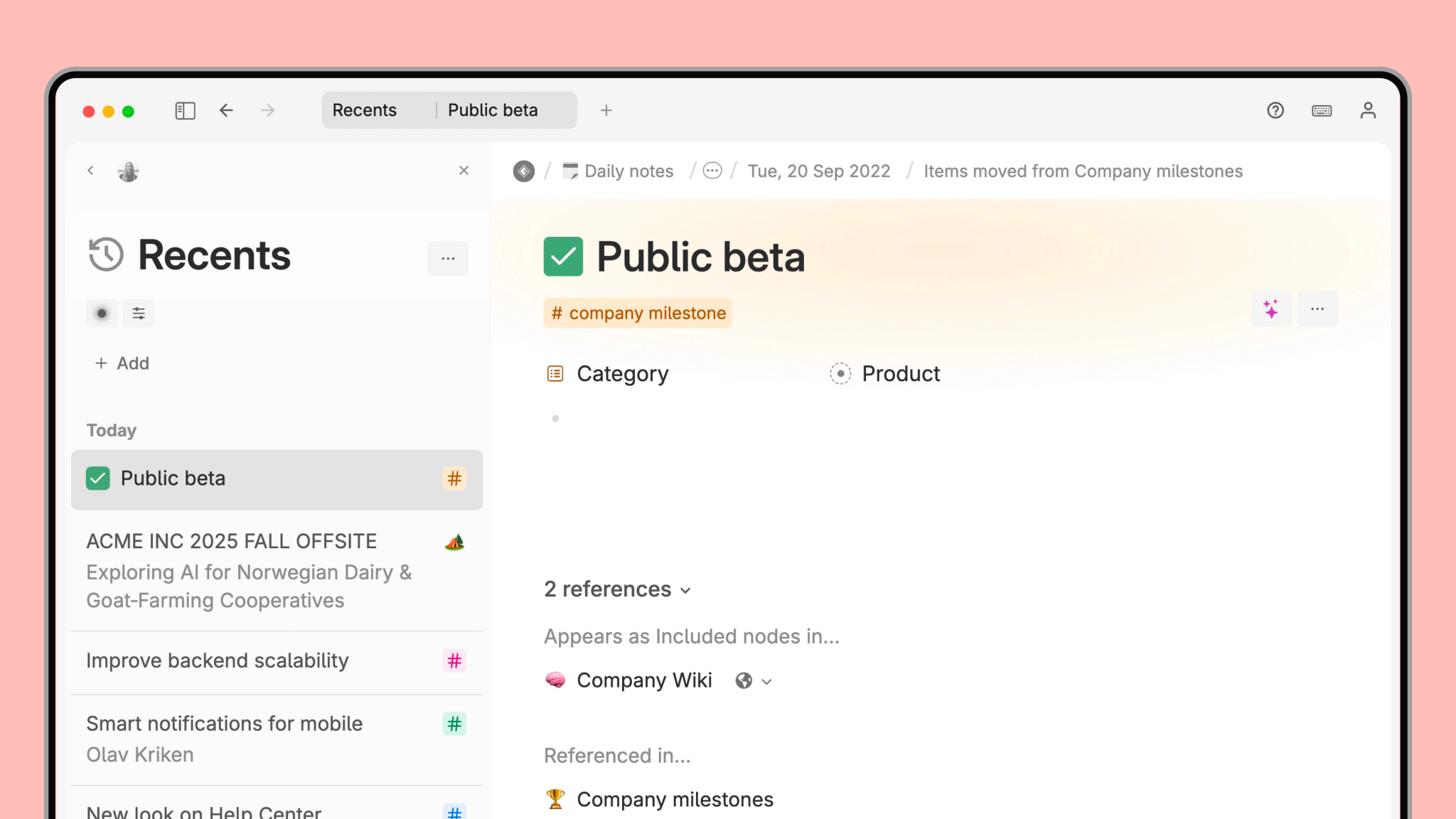
Finding your way back to something you just worked on should be effortless. With Recents, now available at the top of the sidebar for all users, Tana automatically surfaces the 100 most recently edited entities across all your workspaces. It’s the quickest way to resume work, switch context, or recover important notes without digging or searching.
This update reflects a simple idea: when your knowledge lives in a connected system, you shouldn’t need to remember where anything is. Tana should remember for you.
What Recents shows you
Recents displays the 100 most recently edited notes you’ve created or edited. It updates whenever you or a collaborator changes something in the note:
- Editing content
- Updating or setting a field value
- Checking/unchecking checkboxes
- Adding new or editing notes in the mobile app
This makes Recents especially powerful for users who work across many projects, collaborate in shared workspaces, or use Tana for meetings and fast-moving decision cycles.
To keep the list focused and useful, Recents only includes top-level nodes ("entities"), not every nested bullet or child node inside your documents.
A node will be treated as an entity if it:
- Has a supertag
- Lives at the top level of your Library (direct child)
- Was created from the Capture tab in the mobile apps
There is now also a dedicated search operator, IS ENTITY, making it easy to build your own live searches that filter down to entities only. If some nodes are not treated as an entity, but you would like them to be, you can do Ctrl/Cmd+K > Set entity override to entity
A smarter way to track your recent work
Recents groups items by date and sorts them by Last edited time, with the newest activity at the top. It surfaces changes across all the workspaces you have added in the sidebar, so you can see movement in shared documents as soon as teammates update them.
Changing field values now updates the system field Last edited time, not just content changes like it has been before.
- If the note has a Supertag with pinned fields, they will be automatically displayed on the note in Recents
- Calendar nodes are excluded so your daily notes don’t flood the list
This gives you a clean, high-signal feed of what actually changed in your world.
Easy access in the sidebar
Recents is a system view, designed to be consistent and predictable for everyone, and can’t be customized. But you can hide it, reorder items in the top of the sidebar, and restore them at any time.
- Right-click Recents to hide it
- Bring it back via Settings > Preferences or Cmd/Ctrl+K → Toggle Recents in sidebar
If you want your own customized version of Recents, you can always recreate it as a search and pin it to the sidebar.
Why this matters for users managing meetings, projects, and fast-changing work
Recents gives you instant recall of where your attention has been, without relying on memory or search queries. For users who run many meetings or switch between clients and projects, this means:
- Faster context switching
- No more losing track of important nodes after a long day
- A way to stay up to date on what others have changed
- A lighter cognitive load because Tana handles the remembering
It reflects what Tana is uniquely good at: bringing structure and intelligence to your knowledge without requiring extra effort from you.