

TL;DR
- Meeting intelligence software captures a meeting, turns it into structured data, and routes that output into the tools where work happens. The third part is what separates it from transcription.
- The term is genuinely contested. It grew out of two separate product lineages: sales conversation intelligence, which analyzes calls to coach reps and score deals, and general meeting assistants, which capture any meeting for the whole team. Vendors from each lineage claim the label, which is why definitions disagree.
- The useful way to compare tools is scope and destination: does it know about the meeting you had last month, and does its output land as a filed task or as a document you still have to act on?
- Tana sits at the far end of that second axis. It captures without a bot, turns the conversation into typed records with owners and states, and updates the record you already have instead of adding another summary.
Most definitions of meeting intelligence software are written by a vendor describing its own product. That is why one glossary tells you the category is sales-call analysis and the next tells you it is anything that summarizes a meeting. Both are describing something real. Neither is describing the category. This page defines the term properly, traces where the disagreement comes from, and gives you the tests that actually separate one tool from another. For the ranked field of products, see Best meeting intelligence software for teams 2026.
What is meeting intelligence software?
Meeting intelligence software captures a meeting, converts it into structured data such as a speaker-attributed transcript, topics, decisions and action items, and routes that output into the systems where work actually happens. It is defined by all three steps. A tool that captures and transcribes but leaves the output sitting in its own interface is a transcription tool with extra features.
That third clause is the one to hold on to when comparing products. Capture is close to commoditized: a large share of these products are built on the same handful of meeting-bot and speech-recognition vendors underneath, so the transcript quality between two tools is often nearly identical. What differs is the analysis layer and, above all, where the output goes.
How meeting intelligence software works
Every product in the category runs the same four stages, and the differences between tools are almost entirely in the last two.
- Capture. The tool gets access to the audio. In 2026 there are three distinct ways it does this, and the choice has consequences beyond engineering.
- Transcription. Speech to text, with speaker separation, timestamps and usually multilingual support.
- Analysis. A language model extracts summaries, decisions, action items, topics and, in the sales lineage, conversation metrics such as talk ratio and monologue length.
- Distribution. The output goes somewhere: a document, a CRM record, a tracker ticket, a Slack message, or a searchable archive.
The three capture methods, and why the choice matters
A bot joins the call as a visible participant. This is the most common approach and the easiest to deploy, because it works the same on every platform. The cost is social and administrative: external guests see a recorder in the participant list, some IT departments block it, and you cannot use it in a room where a bot would be unwelcome.
A platform-native API streams the meeting to the tool without a visible participant. Zoom's real-time media streams made this generally available in 2025. It is clean, but it ties you to the platforms that offer it.
Desktop capture records the audio your own machine is already playing and receiving. No bot, no platform dependency, and it works for an ad-hoc call that was never on a calendar. Tana uses this method on macOS and Windows, which is why it captures a Zoom, Teams or Google Meet call without anything joining it.
What meeting intelligence software includes
The component list below is the consensus across the category. Some rows belong only to the sales lineage, and are marked as such, because a general team tool that lacks rep scorecards is not missing a feature. It is a different product.
| Layer | Capabilities | Lineage |
|---|---|---|
| Capture | Bot, native API or desktop recording; calendar auto-join; multi-platform coverage | Both |
| Transcription | Speech to text, speaker separation, timestamps, multiple languages | Both |
| Analysis | Summaries, action items with owners, decision tracking, topic and entity detection | Both |
| Conversation metrics | Talk ratio, monologue length, interruptions, filler words, question rate | Sales |
| Coaching | Scorecards, call libraries, rubric scoring, live battlecards | Sales |
| Distribution | CRM sync, tracker filing, chat and email delivery, searchable archive | Both |
| Cross-meeting | Semantic search over the archive, linking meetings to a project or customer, prior-context briefs | Both, and rare |
| Governance | Retention policies, redaction, role-based access, data residency | Both |
The cross-meeting row is where most of the real difference between products lives, and it is the row most roundups skip.
Why the term means two different things
Two independent product histories ended up sharing one label, which is why you can read two definitions of meeting intelligence software that contradict each other and both be reading an honest page.
The sales lineage started in 2015. Gong and Chorus.ai were both founded that year to record sales calls and analyze them so average reps would behave more like top performers. In 2019 Gong repositioned around a new term, revenue intelligence, aiming at forecasting rather than the call itself. Chorus was acquired by ZoomInfo in 2021. This lineage treats the deal, not the meeting, as the unit of analysis, and it carries machinery that only makes sense in sales: rep benchmarking, deal risk scoring, coaching rubrics and mandatory CRM write-back. Gartner formalized this end of the market as revenue action orchestration in late 2025. Notably, it has no meeting intelligence category at all.
The general lineage started around 2016, with Otter.ai and Fireflies.ai arriving from transcription and personal productivity rather than from sales. This branch treats the meeting as the unit of analysis, works for standups, one-to-ones, planning and interviews, and sends its output to documents and trackers rather than a CRM. It deliberately lacks the coaching layer, because scoring people on their internal one-to-ones is a trust problem rather than a feature.
The accurate relationship: meeting intelligence is the umbrella term for software that turns any meeting into structured, actionable data. Conversation intelligence is the older, narrower term for the sales branch. Every conversation intelligence product is a meeting intelligence product. The reverse is not true.
Meeting intelligence software compared to adjacent terms
Adjective-based distinctions are unfalsifiable, so each row below gives you a question you can actually answer about a specific product.
| Term | The real distinction | The test |
|---|---|---|
| Transcription tool | Produces text and stops. The output is a file, not a record in another system. | Does anything leave the transcript? |
| AI notetaker | The same category operating at single-meeting scope. It answers what happened in this meeting. | Does it know anything about the meeting you had last month? |
| Conversation intelligence | Same core, sales scope, plus the deal object, coaching scorecards and CRM write-back. | Is the unit of analysis the meeting, or the deal and the rep? |
| Revenue intelligence | The sales branch repositioned upward. Call data is one input among email, calendar and CRM activity. | Is the deliverable a better meeting, or a better forecast? |
| Meeting management software | Works on the before and around: agendas, scheduling, minutes templates, decision logs. | Would the product still be useful if nobody spoke? |
| Agentic meeting platform | The output is not a document to act on. It is work already drafted and filed. | After the meeting, is there a summary to read, or work already done? |
The last row is the direction the category is moving, and it is where Tana is built. See What are agentic meetings in 2026 for that distinction in full.
Consent, compliance, and who owns the transcript
Nearly every glossary page on this topic skips this, and it is the question buyers actually get stopped by. Three things to settle before you roll a tool out.
Consent. Recording law varies by jurisdiction, and some regions require every party to agree rather than just one. If your meetings include customers or candidates, you need per-meeting control, automatic disclosure, and the ability to exclude sensitive meeting types entirely. A bot in the participant list is at least visible; silent capture puts the disclosure obligation entirely on you.
Training. Ask directly whether your transcripts are used to improve the vendor's models, and get the answer in the contract rather than the marketing page.
Ownership and exit. The transcript archive becomes one of your more valuable records within a year, which makes it a lock-in risk. Check default retention, whether deletion is granular, and whether you can bulk export the corpus if you leave.
Tana's answer to the middle question is structural rather than contractual: AI operates strictly within the permissions of the person invoking it, spaces scope content to their members, and documents inherit that and can be tightened further. Tana has completed its SOC 2® Type 2 examination and can send the report on request. HIPAA is still in progress, so if you need that today, ask before you commit.
Where meeting intelligence software fails
Being clear about this is more useful than another benefits list, and it is what you should test for during a trial.
Accuracy degrades exactly where it matters. Accented speech, crosstalk, and domain jargon are where word error rates climb, and those are common in the meetings you most want captured. Test on your own recordings rather than the vendor's demo.
Extracted action items can be invented. A language model asked to find commitments in a conversation will sometimes find one that nobody made, attach the wrong owner, or promote an idea someone floated and dropped. This is the failure mode with the highest cost, because a fabricated task looks exactly like a real one.
The record goes stale. A tool that writes one static summary per meeting re-summarizes the same ground call after call. Ten weeks into a recurring meeting you have ten documents describing an evolving situation and no single record of where it actually stands.
The third failure is the one Tana was built against. When it extracts from a meeting, it first searches the whole workspace for a record that is already the same thing, the same bug, the same customer, the same decision, and updates that record instead of creating a duplicate. Pin a project document to a recurring meeting and each call folds into that one record rather than spawning a parallel one.
Do you need it if your meeting platform already includes AI?
This is the real 2026 buying question, and almost nobody writes it down. Zoom AI Companion, Microsoft 365 Copilot in Teams and Gemini in Google Meet all ship meeting summaries at no incremental cost on plans you are probably already paying for. Your baseline is not zero. It is the free thing you already have.
The bundled option is genuinely enough when three things are true: all your meetings happen on one platform, a summary you read is the deliverable, and nobody needs to find out in November what was decided in June. If you have no intention of leaving that platform, the included summary is a real upgrade over nothing, and adding no new vendor is worth something.
You have outgrown it when you meet on more than one platform, when the output needs to land in a tracker rather than a meeting recap, or when the answer to "what did we decide and why" has to survive the quarter. Bundled assistants are strongest inside their own platform and weakest at the cross-meeting layer, which is precisely the row that matters most.
How to evaluate meeting intelligence software
Eight questions, ordered by how often they turn out to be the deciding factor.
- How does it capture? Bot, native API or desktop audio. This determines whether external guests see a recorder, whether IT will allow it, and whether it works when you are not the host.
- What happens to the output? Does it report, or does it write into your systems of record? Ask for the list of tools it can create something in, not the list it integrates with.
- Does context carry across meetings? Ask the vendor how meeting forty knows about meeting one. Search over an archive is not the same as a record that updates.
- How accurate is it on your meetings? Test with accents, crosstalk and your own jargon.
- How is it priced? Per seat, per minute or per recorded hour, and what the free tier actually restricts. The gap between a notetaker and a sales platform in this category is roughly tenfold.
- What are the consent and retention controls? Covered above, and worth settling before procurement rather than during.
- Can you export? The archive is the asset.
- Who is it for? A sales-lineage tool bought for an engineering team brings scorecards nobody wants and misses the tracker filing they need.
Where Tana fits
Tana is a meeting intelligence product that answers the second and third questions differently from most of the field. It captures from the desktop app on macOS and Windows without a bot joining, so it covers Zoom, Teams, Google Meet and an ad-hoc call that was never on a calendar. During the call you can turn any stretch of the conversation into a typed record, an artifact or a skill run, and it appears live for everyone in the room.
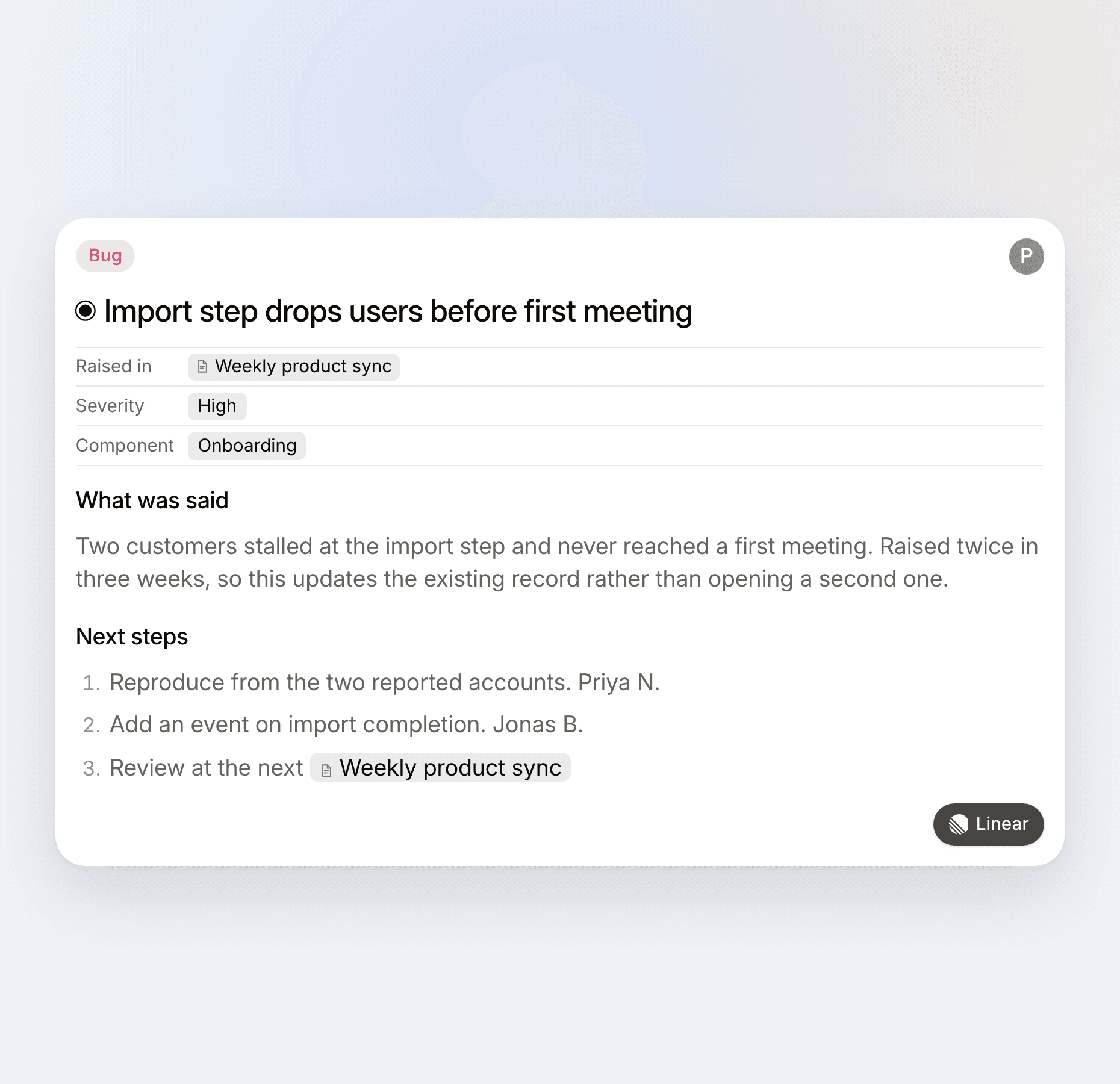
What it produces is not a summary document but typed records: a bug with a severity and a component, a decision with its rationale, a task with an owner and a state. Those file into the tools you already run on, including Linear, Jira, GitHub, Slack and HubSpot among others, and an MCP server extends the reach to coding agents and anything else that speaks it. Every change arrives as a proposal you approve before it is written, and updates and deletions always need your say-so.
The part that compounds is the record. Ask chat what your team decided about something and it answers from your own workspace, linking each source document and, for meetings, the exact moment in the transcript.
- Best for: teams that want the meeting to end in filed work and a record that answers questions later, on any platform.
- Tana's honest catch: the value builds as your team runs its work in it. On day one it captures and files well. By week ten the connected record is the part you would not give up. If a clean summary of each call is all you want, that depth is more than you need.
A note on the statistics you will see quoted
Several numbers circulate about this category that do not survive a check, including a widely repeated figure for annual money wasted on meetings that traces to an infographic with no published methodology, and a percentage of action items that are supposedly never completed, for which no primary research exists at all. Be careful quoting them.
The figures that do hold up are narrower and more useful. Harvard Business Review's 2017 survey of 182 senior managers found 71% considered meetings unproductive and inefficient, and 65% said meetings kept them from completing their own work. Microsoft's Work Trend Index special report in June 2025, covering 31,000 knowledge workers, found 57% of meetings are ad hoc with no calendar invite, which is a direct argument for capture that does not depend on a scheduled event. An Atlassian survey of 5,000 knowledge workers found 54% frequently leave meetings without a clear idea of next steps or who owns which task. That last one is the honest version of the follow-through problem.
The verdict
Meeting intelligence software is a three-part definition: capture, structure, and route into the tools where work happens. Most products do the first two well and differ enormously on the third. The term is contested because two lineages share it, one built for analyzing sales calls and one built for capturing any meeting, and knowing which one a vendor comes from tells you more than its feature list will. When you evaluate, compare on capture method, destination and cross-meeting continuity, and measure against the assistant your meeting platform already bundles rather than against nothing. If the goal is a summary to read, the bundled option is often enough. If the goal is that the meeting produces the work and the record still answers questions a quarter later, that is the end of the category Tana was built for.
Frequently asked questions
What is meeting intelligence software in simple terms?
It is software that records a meeting, turns what was said into structured information such as a transcript, decisions and action items, and then sends that information somewhere useful, like your CRM, your issue tracker or a shared record. The last step is what makes it more than a transcription tool. Tana takes that step furthest: the meeting produces typed records with owners and states that file into the tools your team already uses.
What is the difference between meeting intelligence and an AI notetaker?
They are the same category at different scopes. An AI notetaker answers what happened in this meeting. A meeting intelligence tool worth the name also answers what your team decided three months ago and how this meeting relates to it. The honest test is whether the product knows anything about your previous meetings. Tana is built on that side of the line, because each meeting updates a connected record rather than adding another standalone summary. See Why AI notetakers fail to drive action.
Is conversation intelligence the same as meeting intelligence?
No, though several glossaries say so. Conversation intelligence is the older term, from 2015, for the sales branch of the category: recording sales calls to coach reps, score deals and feed the CRM. Meeting intelligence is the umbrella term covering any meeting type. Every conversation intelligence product is a meeting intelligence product, but a tool built for standups and planning is not a conversation intelligence product and does not need to be. Tana sits in the general branch, and reaches CRMs including HubSpot when the work calls for it.
Do I need meeting intelligence software if I already have Zoom AI Companion or Microsoft Copilot?
Not necessarily. If every meeting happens on one platform and a summary you read is the deliverable, the bundled assistant is a reasonable place to stop. You outgrow it when meetings span platforms, when output needs to land in a tracker rather than a recap, or when you need to recover a decision months later. Those three are what Tana adds: capture on any platform without a bot, filing into your own tools, and a record that stays current instead of accumulating summaries.
How much does meeting intelligence software cost?
The range across the category is unusually wide, from free notetaker tiers to enterprise sales platforms in the low thousands per seat per year, because the two lineages price very differently. Watch for the metering model, since per-seat, per-minute and per-recorded-hour plans behave nothing alike at scale. Tana is free to start with five hosted meetings a month, and Pro is 20 dollars per user per month billed yearly, with a 30-day trial and no credit card required.
Does meeting intelligence software work without a bot in the call?
Some of it does. Three capture methods exist: a bot that joins as a visible participant, a platform-native stream, and desktop capture that records the audio your own machine is handling. Tana uses the third, from its desktop app on macOS and Windows, so nothing joins your Zoom, Teams or Google Meet call and it can capture an ad-hoc conversation that was never on a calendar. See Best Otter alternatives for AI meeting notes 2026 for how that compares across tools.
All product details were verified in August 2026.
Explore further
