TL;DR
- The best Otter alternative depends on what you want the meeting to produce, not just how well it transcribes.
- Tana is the strongest pick for most teams: it captures the call bot-free and takes clean multilingual notes, then its AI agents do the work the meeting was about. They file issues, draft pull requests, specs, and memos, sync to your CRM (HubSpot), and update a connected knowledge base, each ready for you to review and send.
- The other tools are the call when your needs are narrower: Fireflies if deep CRM and pipeline sync is the whole job, Fathom if a generous free notetaker is all you want, Granola if a personal notepad in your own words is all you want, Zoom AI Companion if you only need summaries inside the Zoom you already pay for.
Otter helped invent this category, and for clean transcription it still holds up. But in 2026 most teams are not short on transcripts. They are short on follow-through. That shift is why people start looking for an Otter alternative in the first place, so this guide ranks the options by what they help you do after someone stops talking, not just how accurately they capture it.
Why people look for an Otter alternative
A few patterns come up again and again:
- The output stays stuck as notes. Otter is built around capture: transcripts, summaries, searchable archives. The notes rarely turn into action without someone doing the work manually afterward.
- Pricing feels steep for what you get. Otter Pro runs about $8.33 per user per month billed annually, with Business closer to $20, and several useful features (like video replay) sit behind higher tiers. Fireflies and Fathom undercut this for comparable note-taking.
- Speaker identification and support frustrations. Hit-or-miss speaker labeling and slow support are common complaints.
- A visible bot in the call by default. Otter's notetaker joins the meeting as a participant when it auto-joins from your calendar, which can feel intrusive in sensitive or client conversations. Recording without it means starting from Otter's desktop app yourself, on macOS or Windows, rather than letting the calendar handle it.
If any of these is your reason, the right replacement is not necessarily "a better transcriber." It might be a tool that closes the loop instead of just recording it.
How to compare AI meeting tools in 2026
Transcription quality has largely converged: most serious tools claim around 95% accuracy in clean audio, though real-world numbers drop with accents and background noise. So the useful comparison criteria have moved on:
- Capture style. Does a third-party bot join the call, or is capture bot-free? This matters for sensitive meetings and external optics.
- Structured output. Do you get a flat summary, or structured action items, decisions, and records you can route somewhere useful?
- Workflow fit. Do the notes connect to your CRM, your task tracker, your codebase, and your wider knowledge, or do they sit isolated in a notes app?
- Does it act, or just record? This is the real 2026 dividing line: tools that summarize what happened versus tools that do some of the work the meeting was about.
Comparison at a glance
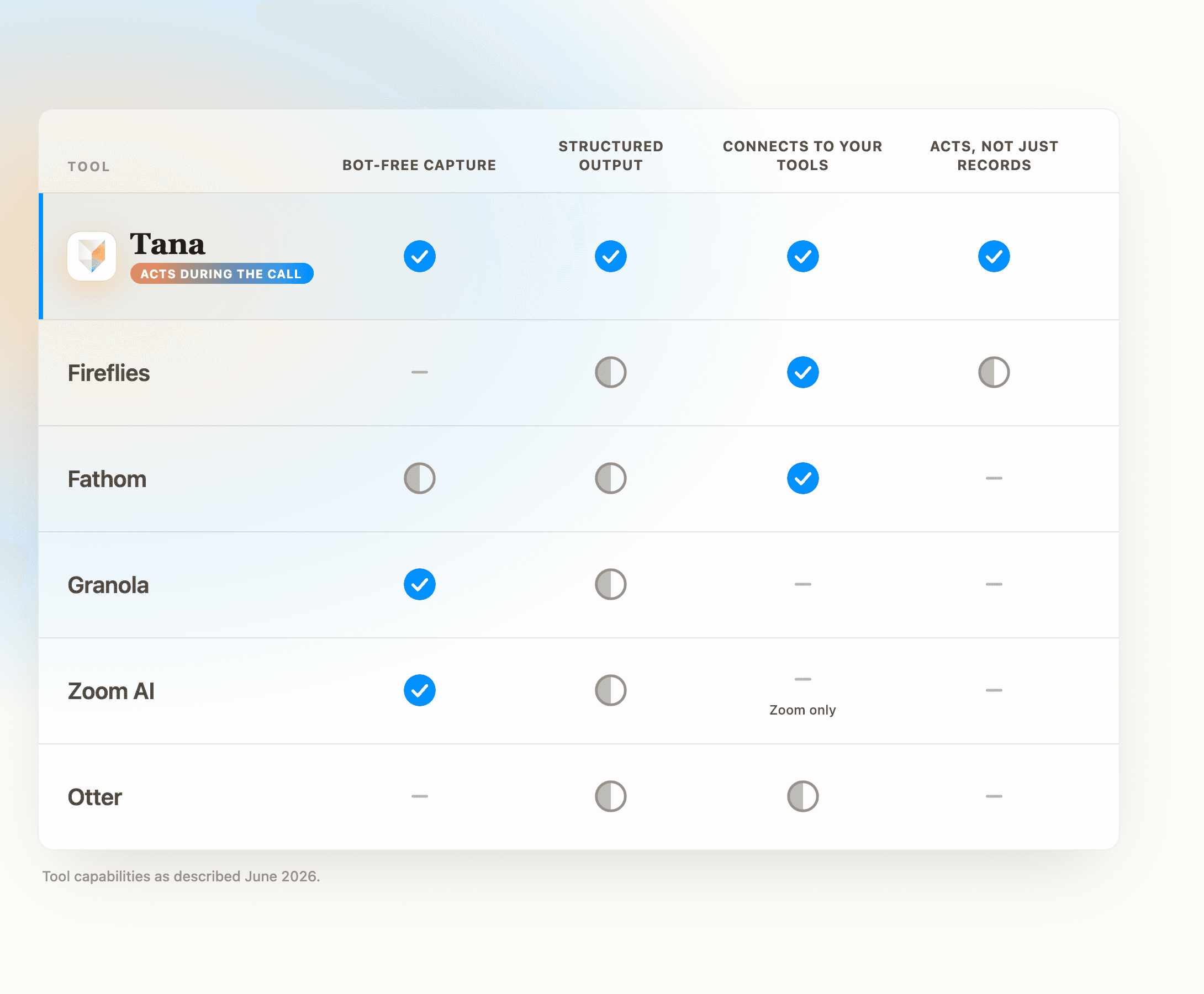
| Tool | Best for | Capture | Goes beyond notes? | Starting paid price* |
|---|---|---|---|---|
| Tana | Teams that want work done in the meeting | Bot-free native meeting; also captures external calls | Yes: files issues, drafts PRs, specs and memos, updates a context graph | Free, then early bird from $20 |
| Fireflies | Sales teams needing CRM sync | Bot joins call | Partly: CRM sync, conversation intelligence, agentic AI Apps | ~$10 / user / mo |
| Fathom | Generous free recording | Bot, with a bot-free option in beta | Limited: notes, CRM sync on paid | ~$19 / user / mo |
| Granola | Personal notes in your own words | Bot-free (background audio) | No: enhanced personal notes | From $14 / user / mo |
| Zoom AI Companion | Teams already all-in on Zoom | Built into Zoom | Minimal: summaries, action items, some agentic retrieval | Included with paid Zoom plans |
*Pricing as of mid-2026, per seat at annual billing where applicable; monthly billing and add-ons cost more. Check each vendor's page before buying.
The 5 best Otter alternatives
1. Tana, best for turning meetings into finished work
Most tools on this list help you after the call. Tana is built to do the work during it. It is an agentic meeting platform, so the meeting produces finished work, not just a recap.
Its meeting agent transcribes multilingual calls, auto-detecting the language per speaker, and writes a concise, interconnected summary. The summary does not sit in a separate notes silo; it lives in a context graph, linked to the people, projects, and decisions it relates to.
From there AI agents draft real work as you talk: file issues into GitHub, Linear, or Jira, hand a bug to a coding agent to open a pull request, and draft a feature spec, a storyboard, an investment memo, or a Slack update, each one prepared for you to review and send.
Integrations cover GitHub, Slack, Linear, Jira, and HubSpot; it hands prompts to coding agents like Claude Code, Codex, and Cursor; and it runs an MCP server so an agent like Claude can read and write your Tana graph directly. Because every meeting feeds the same graph, the next one already knows the history.
- Best for: product, engineering, and operating teams that want execution, not just a recap.
- Strengths: AI agents that draft real work during the meeting, structured output tied to a living context graph, deep tool integrations, multi-model AI (OpenAI, Anthropic, Google).
- Trade-offs: it is a meeting platform, not a single-purpose transcriber, so it aims higher than just capturing the call. If a plain transcript is genuinely all you will ever need, that is more than the job requires.
- Pricing: free plan (five meetings a month with AI transcripts, summaries, and 50 AI queries); paid early bird pricing from $20 per user per month.
2. Fireflies, best for sales teams and CRM
Fireflies auto-joins calls across Zoom, Google Meet, and Teams, supports 100+ languages, and pairs transcription with conversation intelligence and an AI assistant called AskFred. Its real strength is CRM sync with tools like Salesforce and HubSpot, which makes it a natural fit for revenue teams, and in 2026 it added agentic AI Apps that auto-generate deal memos, scorecards, and CRM updates.
- Best for: sales and customer teams that need meeting data flowing into a CRM.
- Strengths: broad integrations, conversation analytics, competitive entry price (Pro around $10 per user per month billed annually).
- Trade-offs: an AI-credits system gates the advanced and agentic features (AI Skills, Sales Assist, CRM autofill), and credits can run out mid-month, with add-on packs to buy more; lower tiers also have a 2-hour per-meeting cap. Even with its AI Apps, the center of gravity stays capture, insights, and CRM routing, rather than filing the issue or drafting the spec the meeting was about.
3. Fathom, maybe the best free tier
Fathom has maybe the most generous free plan in the category as of now: unlimited recording and transcription at no cost, with advanced AI summaries on the first five meetings each month and a basic summary after that. It is consistently well rated, with fast post-call processing, and recently added a bot-free capture option alongside its visible bot.
- Best for: individuals and small teams who want capable notes for free.
- Strengths: genuinely unlimited free recording, clean automated summaries, strong reviews.
- Trade-offs: the searchable archive is thinner than Otter's, language coverage is narrower than Fireflies, and notes stay isolated from the rest of your work. Paid plans (Team and Business) run about $19 to $34 per user per month.
4. Granola, best for personal notes in your own words
Granola took a different path: no bot joins the call. It listens to system audio in the background while you type your own notes, then uses AI to expand what you wrote, so the result reads like your own notes rather than a generic summary. The app is clean and single-purpose, and it now runs on Mac, Windows, and iPhone.
That bot-free capture and tidy output are genuine, but they are not where Granola pulls ahead, because Tana captures external calls bot-free too and writes clean notes from them. The honest line is that Granola is a focused notepad and stops there: the notes sit in a meeting-notes app, disconnected from the document you discussed, the tasks that follow, and the rest of your knowledge. If a personal record of the call is all you want, Granola is a polished way to get it. If you want the meeting to feed your work, it leaves that to you.
- Best for: individuals who want a clean notepad in their own voice and nothing downstream of it.
- Strengths: notes that read like your own, minimalist design, nothing to set up.
- Trade-offs: output stays isolated from your tools and your wider knowledge; there are no agents, no graph, and no filed work. The free plan limits history, and paid starts around $14 per user per month.
5. Zoom AI Companion, best if you already live in Zoom
If your meetings already happen in Zoom, AI Companion is included at no extra cost on paid Zoom Workplace plans. It generates post-meeting summaries, action items, and answers questions in real time, and its 2026 release added some agentic retrieval across connected apps like Google Drive and OneDrive.
- Best for: teams committed to the Zoom ecosystem who want zero added cost.
- Strengths: free with paid Zoom plans, no extra tool to manage, decent summaries for straightforward calls.
- Trade-offs: it works best in English, summaries can misread context or occasionally fail to generate, and it has no CRM sync, no conversation intelligence, and no way to file issues, open PRs, or draft the work a meeting is meant to produce.
How to choose
- You want meetings to produce finished work, not just notes: Tana.
- All you need is a record of the call, and you already use one of these: the notetaker you have is probably fine, and switching may not be worth it.
- CRM and pipeline sync is the whole job: Fireflies has the deepest CRM coverage and is the pick. (Tana syncs to HubSpot too, if you want the meeting to do more than update the CRM.)
- You only need a free notetaker for raw volume: Fathom's free tier is maybe the most generous as of now, while Tana's free plan records less but turns each meeting into connected, queryable knowledge.
- You only need a personal notepad in your own words: Granola is clean and focused. Tana captures bot-free too (a solo operator's calls included), but it connects each meeting into a knowledge graph and turns it into work instead of leaving notes in an app.
- You already pay for Zoom and only need summaries: Zoom AI Companion is the zero-cost option.
The honest summary: if your problem is "I need a record of what was said," any of the tools here will beat the frustrations that send people away from Otter, and if one already works for you there is no urgency to switch. But Tana clears that bar too, with bot-free capture, clean multilingual notes, and a CRM sync, then goes further. If your problem is "decisions get made in meetings and then nothing happens," that is a different problem, and an AI agent that does the work during the meeting is the only category that actually solves it.
Frequently asked questions
Is there something better than Otter for meetings?
It depends on the job. If you only need cleaner transcription and notes than Otter, Fireflies, Fathom, and Granola each address its common complaints around price, bots, and isolated output. Tana clears that bar too, with bot-free capture and clean notes, and then acts on the conversation instead of only recording it, which is the real step up for meetings that need to produce work.
What is the best Otter alternative for AI agents in meetings?
Tana. Where Otter and most alternatives stop at notes and summaries, Tana's agents draft real work while you talk: filing issues, drafting pull requests, specs, and memos, and updating a connected context graph, each prepared for you to review and send.
Are there bot-free alternatives to Otter?
Yes, and Otter itself has one now: its desktop app on macOS and Windows records with no bot in the call. The catch is that it is not the default path. Calendar auto-join still sends the notetaker into the meeting, so staying bot-free means remembering to start the desktop app yourself each time. Among the alternatives, Granola captures system audio in the background with no bot, Fathom added a bot-free option in beta on Mac, and Zoom AI Companion is built into Zoom rather than joining as a third party. Tana is bot-free by design, with no bot option at all: it hosts its own calls, and its desktop app captures external Zoom, Teams, and Meet calls in the background, audio and shared screens.
What is the difference between an AI meeting notetaker and an AI meeting agent?
A notetaker captures and summarizes what was said. An AI meeting agent uses that conversation to do work: drafting documents, filing tasks into your tools, and maintaining context across meetings. Otter is a notetaker. Tana is an agent platform.
Do Otter alternatives integrate with my CRM and tools?
Some do. Fireflies and Fathom sync with CRMs like Salesforce and HubSpot. Tana connects natively to GitHub, Slack, Linear, Jira, and HubSpot, hands prompts to coding agents like Claude Code and Codex, and runs an MCP server so an agent like Claude can work directly with your Tana graph. Zoom AI Companion is mostly confined to the Zoom ecosystem, though its 2026 release reaches into a few connected apps.
Which Otter alternative is best for free?
For raw recording volume, Fathom has maybe the most generous free tier as of now, with unlimited recording and transcription (advanced AI summaries are capped at five meetings a month, then a basic summary). Tana, Fireflies, and Granola also offer free plans with usage limits; Tana's records fewer meetings a month but turns each one into connected, queryable knowledge rather than a standalone transcript.
Explore further