

 Try Tana free
“Hey Ari, what moved this week, and why?”

Your Ari
Costs are up, but it’s mostly one-time legal work from July and August. Revenue is on plan.
Recent spending pressurecfo.ai · Revenue vs. operating costsRevenueOperating costs
 Ariinto the meeting
With your model, scenarios and actual numbers. Talk through the business, and it answers the CFO questions while you’re still talking.
You
Hey Ari, can we afford two more AEs next year?
Your Ari
Yes. Two AEs starting in March pay back in 11 months, and ending cash only dips $46K. Your main plan stays as it is until you merge it.
Hire 2 AEs at $280K OTE eachcfo.ai · Ending ARR 2027 · Not mergedUpside$18.6MBase$17.9MDownside$17.2MNo hires$16.5MGet suggestions as you talk, nudge it, or ask Ari out loud for answers mid-meeting. Nobody has to say “let me get back to you.”
A board deck, a budget, a pipeline report: whatever someone shares, Ari can work with it.
Your books, payroll and billing, synced every night, so the answer comes from the business, not a guess.
“The best CFO answers happen in the room, the moment someone asks if we can afford it. With Tana, Ari is in that room too, with your real numbers, while the question is still on the table.”
Say “Hey Ari”, accept a suggestion as you talk, or nudge it to do the work.
“Hey Ari, what moved this week, and why?”
Your Ari
Costs are up, but it’s mostly one-time legal work from July and August. Revenue is on plan.
Recent spending pressurecfo.ai · Revenue vs. operating costsRevenueOperating costs“We need to cut costs without touching headcount.”
You
@Ari
Your Ari
Travel and SaaS tools are your biggest openings, about $21K a year together. Payroll stays at $31,500 a month.
Savings opportunity rankingcfo.ai · Annualized potentialTravel and client visits10.9K / yrSoftware and SaaS tools10.2K / yrAdvertising and sponsorships8.3K / yrOffice rent and utilities7.6K / yr“We can’t make the launch without another engineer.”
Your Ari
Sounds like you’re weighing a hire. Add a senior engineer to a scenario and see what it does to runway?
YesNot now“The board will ask what the hiring plan does to our numbers.”
You
@Ari
Your Ari
Here’s the short version for the board: ARR ends $1.4M ahead of plan, and cash only $46K behind.
Board summarycfo.ai · 2027 Growth PlanEnding ARR$17.90M+$1.40MQ4 op. income$591K+$91KEnding cash$8.25M−$46K“Honestly, how long will our cash last?”
Your Ari
Want me to run runway at today’s burn, and again with the two AEs you hired in the plan?
YesNot now“Hey Ari, where does the $38,900 for software come from?”
Your Ari
The last 12 months of software and SaaS spend, straight from your books. Open it to see the formula and every source row.
Savings opportunity assumptionscfo.ai · Jan 2026 to Dec 2027Expense category/ month12 monthsPayroll and contractors$31,500$372,000Software and SaaS tools$3,400$38,900Travel and client visits$2,600$27,400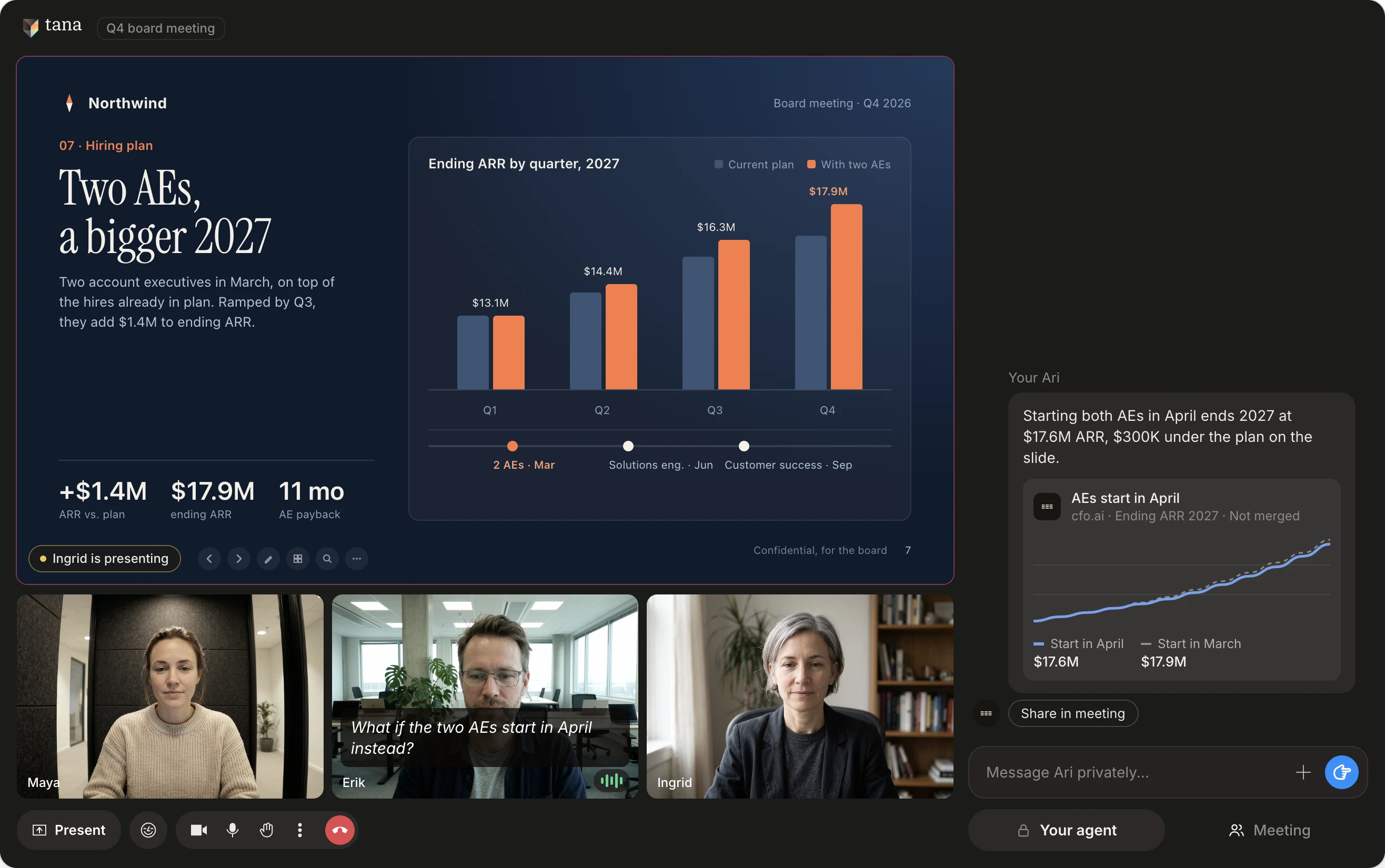
Now part of every meeting, so the numbers are in the room before someone asks.
Every figure still opens to its formula and source rows.
Ari builds it from your actual numbers and keeps it current. Nobody rebuilds a spreadsheet before the meeting.
Ari reads your books, payroll and billing. Nothing writes back to them.
QuickBooks, Xero, NetSuite, Stripe, Gusto, Rippling and more sync nightly, so the model keeps up with the business.
Open any figure to see its formula and source rows. If Ari can’t verify a number, it says so.
Try a hire or a price change in a scenario. Your main plan doesn’t change until you merge it.
Ari runs on the cfo.ai account you already have, signed in as you. Nothing extra to install.
*Ari runs under your own account and admin settings. If you’ve let Ari train on your data, cfo.ai may do so. Tana never will, and you can disconnect Ari in Settings at any time. How it works for IT →
On Mac or Windows, so Tana can listen in your Zoom, Meet and Teams calls.
In Settings, External agents. Sign in with your cfo.ai account once.
Pick your cfo.ai workspace the first time, then ask what you’d ask a CFO.
Copy a link to a comprehensive description of Tana, how it compares to other tools, its features and capabilities. Paste it into Claude, ChatGPT or whichever agent you use.
Yes. Ari answers from your own cfo.ai model. Sign in once in Settings, External agents, and it’s ready in every meeting.
No. Ari reads your books, payroll and billing, and nothing writes back to them. A scenario stays apart from your main plan until you merge it in cfo.ai.
No. Tana connects to your cfo.ai account directly. Sign in once in Settings, External agents.
The first time you ask, Tana asks which cfo.ai workspace to use, and Ari keeps working there for the rest of the chat.
Open any figure in cfo.ai to see its formula and source rows. If Ari can’t verify a number, it says so.
What you ask, a description of what’s on screen, what you’ve asked Tana to remember and the chat so far, through your own cfo.ai account, under your cfo.ai plan’s terms. See how it works for IT for the full picture.
Yes. One person’s Ari, another’s Claude, in the same meeting.
No. Only you see what you ask and what Ari answers. Post an answer to the room in one click when you want everyone to see it.
No. Tana runs on your computer and captures the call locally. Nothing appears in the participant list on Zoom, Teams or Google Meet, and no bot joins on your behalf.
Yes. Tana listens from the desktop app during Zoom, Google Meet and Microsoft Teams calls, and you can also host the call in Tana itself.
Tana never trains AI models on your meeting data. What you send your own Ari follows your Ari account’s data settings. See the privacy page for how Tana handles your data.
You can start for free. Pro is $19 per user a month, billed monthly. Business starts at $35 per user a month, billed yearly. See pricing for what each plan includes.
No. If a number doesn’t add up, Ari says so. Even with the board in the room.
Try Tana, an agentic meeting platform for teams. Bring your agents into every call, and keep what was decided.
Teammate on Claude, ChatGPT or Lovable? Everyone brings their own. Tana for Claude orTana for ChatGPT orTana for Lovable